Buy Bitcoin With Apple Pay or Google Pay: Fees, Limits, Safety
Yes, you can buy bitcoin and other crypto with Apple Pay or Google Pay, through on-ramps such as MoonPay and through some exchanges, but what you are really paying with is the card stored in your phone. That means card pricing. On Kraken a debit-card deposit costs $0.25 plus 3.75%, against nothing for an ACH bank transfer, and MoonPay's fee runs up to 4.5% whichever of these methods you choose (both checked 9 Oct 2026).
Paying with your phone makes sense for a small, one-off purchase you want to finish in a minute, especially inside a wallet app that already offers it. It makes little sense for regular buying or for large amounts, where the card premium adds up fast. And if a site promises Apple Pay purchases with no verification at all, walk away: licensed providers check identity, and the ones that skip it are where buyers lose money.
Short answer: yes, and it is priced like a card
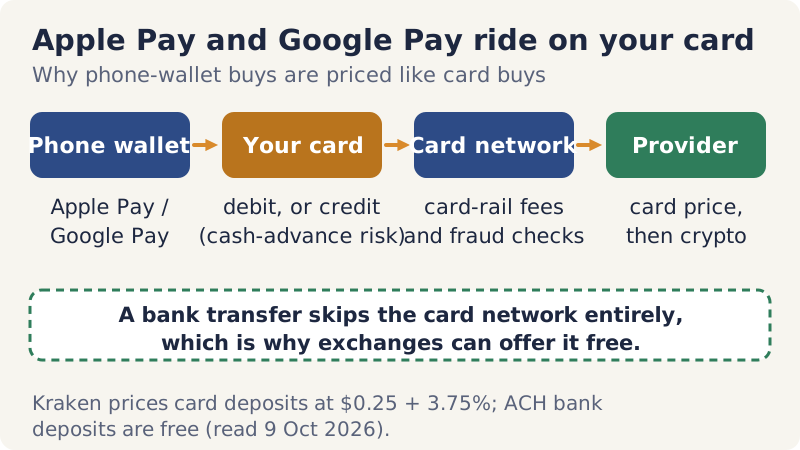
Apple Pay and Google Pay are not separate pots of money. When you tap, the phone passes a payment from the debit or credit card you added to it, and that payment travels over the card network like any other card transaction. The crypto provider therefore treats it as a card payment, with card-level fees and card-level fraud precautions. MoonPay's own help centre makes the link plain: Apple Pay only appears as an option if your bank supports it, and Kraken lists phone-wallet payments alongside its card deposits.
Two consequences follow. First, a phone-wallet buy is never cheaper than a bank transfer at the same provider, because it carries the card-rail cost a transfer avoids. Second, the card behind the wallet matters. A debit card spends your own money. A credit card borrows it, and some card issuers classify crypto purchases as cash advances, which usually means an extra fee and interest from the first day, so check your card terms before you tap. Coinbase's embedded Onramp, for instance, accepts credit cards only outside the US.
Where Apple Pay and Google Pay work
Provider pages vary a lot in how much they say. The table below records only what we could read on the providers' own pages on 9 Oct 2026, and marks the gaps instead of filling them in from elsewhere.
| Provider | Apple Pay | Google Pay | Published cost | Watch for |
|---|---|---|---|---|
| MoonPay | All regions, if your bank supports it | All regions, on Android | Fee up to 4.5%, min. fee up to $3.99, + network fee | Desktop Apple Pay needs an iPhone on iOS 18+ to scan a QR code |
| Kraken | Grouped with card deposits; named on the Australian table | Same as Apple Pay | Debit card $0.25 + 3.75% (min. $10); Australia AUD 0.25 + 3.75% | 72-hour withdrawal hold; not in NY or ME |
| Coinbase Onramp (inside partner apps) | Listed | Listed | Not stated in its docs | Credit cards only outside the US |
| Coinbase app | Not confirmed | Not confirmed | Not confirmed | Not confirmed on any help page we could read |
| Paybis | Not confirmed | Not confirmed | Not confirmed | Its Apple Pay page would not load |
Two gaps deserve a word. Coinbase's help centre publishes no per-method fees we could find, so we cannot confirm current Apple Pay terms or fees in the Coinbase app itself; what we could read is the developer documentation for Coinbase Onramp, the buy widget other apps embed, which lists Apple Pay and Google Pay. Paybis's Apple Pay page would not render either, so check its checkout for the option rather than taking anyone's word for it. If you want the provider whose phone-wallet terms are published in full, that is MoonPay; for a second quote, try Paybis or Coinbase and see what their checkout offers. These are affiliate links, and we may earn a commission.
What it costs: card-rail fees vs a bank transfer, worked example
Take a $200 purchase. On Kraken, funding with a debit card costs $0.25 plus 3.75%, which is $7.75, and the app's instant buy then charges 1% of what is left, about $1.92, for roughly $9.67 before the spread. Funding the same account by ACH costs nothing, so you pay only the $2.00 buy fee plus the spread. On MoonPay, where Apple Pay is offered in every region, the MoonPay fee on $200 can reach $9.00, plus the network fee and any spread built into the price.
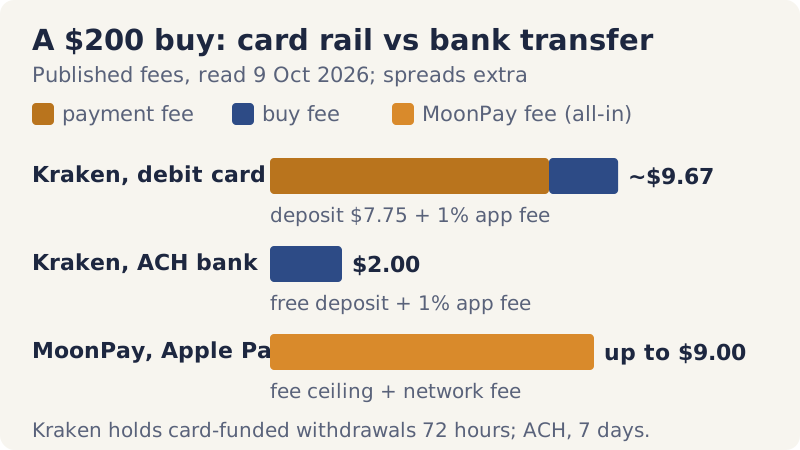
Kraken's US card table names debit cards; its Australian table names Apple Pay and Google Pay explicitly at AUD 0.25 plus 3.75%, so we have used the card figure as the closest published guide. The gap between the first two bars is the whole story of this page: about $7.75 on a $200 purchase, for the privilege of not waiting for a transfer. Pay it once for a small buy if speed matters to you, but do not pay it every month. If you will buy again, a free ACH deposit into an exchange such as Kraken is the cheaper published route (affiliate link; Kraken does not serve New York or Maine).
Limits and KYC: why "no verification" is a warning sign
Limits come from the provider, not from Apple or Google. MoonPay's minimum is usually around €20 or the equivalent and it caps Maine residents at $2,999 per transaction; Kraken's minimum card deposit is $10. Your bank may impose its own daily card limit on top, and some banks decline crypto purchases altogether. Identity checks are also the provider's job: licensed on-ramps and exchanges must verify who you are, and nothing about Apple Pay or Google Pay replaces that.
That is why searches for buying bitcoin with Apple Pay and no verification lead to trouble. A few licensed services let a small purchase through before full checks (Paybis, for example, describes a no-ID allowance for small US buys), but that is a threshold, not anonymity: the payment itself is tied to your bank card and your name. A seller that promises unlimited Apple Pay purchases with no checks is either unlicensed or not selling what it claims. Our page on buying crypto without KYC explains what the real options cost and why most of them are worse for a beginner.
Step by step: buying with Apple Pay and sending to your own wallet
The flow below assumes an on-ramp checkout, the most common place to meet Apple Pay or Google Pay, sending coins to a self-custody wallet you have already set up:
- Open the checkout from an official source: the provider's own site or app, or the Buy button inside a wallet you installed from the official store.
- Choose the coin and the network, then paste your wallet's receiving address, copied from the wallet itself.
- Complete the identity check if the provider asks; first purchases nearly always need one.
- Pick Apple Pay or Google Pay. If it is missing, your bank may not support it for this merchant, or you may be on desktop, where MoonPay's Apple Pay works by scanning a QR code with an iPhone on iOS 18 or later.
- Read the final quote and note the crypto amount, the fee and the network fee before confirming with Face ID, Touch ID or your PIN.
- Check the wallet for the incoming transfer, and keep the receipt for your records and taxes.
If you buy on an exchange instead, the coins arrive in your exchange account first, and any withdrawal to your own wallet may wait behind a hold, which the next section covers. For the wider picture of a first purchase, see our complete guide to buying crypto safely, or the shorter step-by-step version.
Chargebacks, fraud holds and withdrawal delays
Card payments can be disputed after the fact; blockchain transfers cannot be pulled back. Providers manage that mismatch with holds. Kraken's funding page says card, PayPal, Apple Pay and Google Pay purchases trigger a temporary 72-hour withdrawal hold, and that US card purchases may always be held, not just the first one (last updated 1 Oct 2026). For comparison, its ACH deposits come with a seven-day withdrawal hold even though they can be traded at once. We could not confirm Coinbase's hold rules for this check, so assume a hold may apply and look for it before you buy.
Do not treat a chargeback as an undo button. Disputing a purchase you made yourself does not return crypto that has already moved on-chain, and it risks your account with the provider. If your bank blocks the payment, call the bank rather than retrying repeatedly, which can look like fraud and trigger further blocks.
Risks and what can go wrong
Market risk sits on top of everything else: a card-funded buy that costs about 5% in fees starts you behind before the price moves at all. Card risk follows: credit-funded purchases may be treated as cash advances, with fees and immediate interest. Transfer risk is permanent: the wrong network or a pasted address that was swapped by malware or supplied by a stranger means coins you will not see again. Scam risk is the one to rehearse. Nobody legitimate will ask you to buy crypto with Apple Pay to settle a bill, a fine or a support fee. Our guide to buy-side scams lists the scripts, and our comparison of card and bank payment methods goes deeper on the card side.
Apple Pay and Google Pay crypto questions
Can you buy bitcoin with Apple Pay?
How do I buy bitcoin with Google Pay?
Is it safe to buy crypto with Apple Pay?
Can I buy bitcoin with Apple Pay without verification?
Is Apple Pay cheaper than paying by card?
New here? Start with the full step-by-step guide to buying crypto safely, or compare card, debit and bank payment methods.