What Is MoonPay? Fees, Safety and When to Use It (2026)
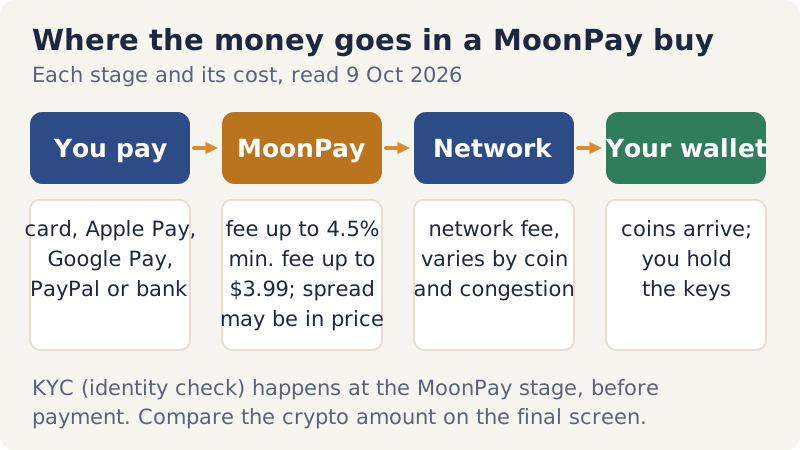
MoonPay is a crypto on-ramp: a licensed payment company that takes your card, Apple Pay, Google Pay, PayPal or bank payment and delivers crypto to a wallet address you choose. It is not an exchange where you trade against other people, and in its standard buy flow it is not where your coins live afterwards. Per MoonPay's own pricing disclosure (checked 9 Oct 2026), its fee is up to 4.5% per transaction, with a minimum fee of up to $3.99 on small buys, and a network fee and possibly a spread come on top.
It suits someone who wants a fast, one-off purchase sent straight to their own wallet, often from the Buy button inside a wallet app. It is usually the wrong tool for anyone planning to buy every month, because a regulated exchange funded by bank transfer publishes far lower fees. And if anyone else handed you the wallet address to paste into the checkout, stop there: crypto sent to an address you do not control is gone once it confirms.
What it is (and isn't): an on-ramp, not an exchange or a wallet
Think of MoonPay as the checkout counter between ordinary money and a blockchain. You tell it which coin you want, how much to spend and where the coins should go; it verifies who you are, takes the payment, supplies the crypto and broadcasts the transfer. MoonPay says it is available in more than 160 countries, and its homepage cites more than 35 million accounts created (both checked 9 Oct 2026). Because it is built to be embedded, plenty of people use it without ever visiting moonpay.com: the Buy button in a wallet or app often opens a MoonPay checkout.
Three things it is not. It is not an order-book exchange, so you accept a quoted price rather than placing limit orders against other traders. It is not a savings product, so there is no yield to expect. And in the standard buy flow it is not your wallet: the coins go to an address you supply, which means their safety afterwards depends on the wallet holding them. MoonPay does run account features of its own, such as a fiat balance, so read what each screen offers before you treat any of it as storage.
How a purchase works, step by step
The order of a checkout is much the same whether you start on moonpay.com, in its app or inside a partner wallet. Expect these stages:
- Pick the coin, the amount and the network. The network matters as much as the coin: a token on one chain is not interchangeable with the same token on another inside your wallet.
- Paste the receiving address. Copy it from your own wallet's Receive screen, never from a message or a page someone else controls.
- Pass the identity check. MoonPay operates under money-transmitter licences, so expect KYC checks before a first purchase.
- Choose how to pay. Card, Apple Pay and Google Pay are offered widely; PayPal, Venmo and bank transfers only in some regions (see the table below).
- Read the quote. It shows the MoonPay fee, the network fee and the crypto you will receive. That last number is the one to compare.
- Confirm and wait. Once the payment clears, MoonPay sends the coins on-chain, and your wallet shows them after the network confirms the transfer.
The minimum purchase is usually around €20 or its equivalent, because network costs make tiny buys uneconomic, and the exact floor appears at checkout. One state-level quirk is worth knowing: MoonPay caps buyers in Maine at $2,999 per transaction, per its help article on buying (checked 9 Oct 2026).
What it really costs: fee, network fee and spread
MoonPay's pricing disclosure describes three layers, and the headline fee is only one of them. The MoonPay fee is up to 4.5% of the transaction for direct customers, with a minimum fee of up to $3.99 when the amount falls below a threshold; buying through a partner app can carry a minimum of up to $4.50. The network fee pays the blockchain to move the coins, so it changes with the coin and with congestion. And the price itself may include a spread, a markup over the market rate that never appears as its own line.
MoonPay does not publish a fee table by payment method. The split you will see repeated elsewhere, roughly 4.5% for cards and 1% for bank transfers, comes from third-party reviews, and we could not confirm it on any MoonPay page, so treat 4.5% as a ceiling rather than a quote. Two cheaper paths do appear in the disclosure: paying from a MoonPay fiat balance carries no MoonPay fee, and Cash App Pay transactions are charged 2.9% plus $0.30 (checked 9 Oct 2026).
A worked $100 example
Say you spend $100 by card. At the 4.5% ceiling, up to $4.50 goes to MoonPay. The network fee depends on the coin: moving bitcoin at a busy moment costs more than moving a token on a cheap network. Any spread is folded into the rate. So the honest comparison is to note the crypto amount the final screen promises, then ask another provider the same question for the same $100 on the same day. Whichever leaves more of the coin in your own wallet was cheaper.
Size widens the gap. A percentage fee grows with the purchase, and an exchange's trading fee usually starts lower. The chart sets MoonPay's published ceiling beside the published fees of two other routes, PayPal's in-app crypto and Kraken, for the same two amounts.
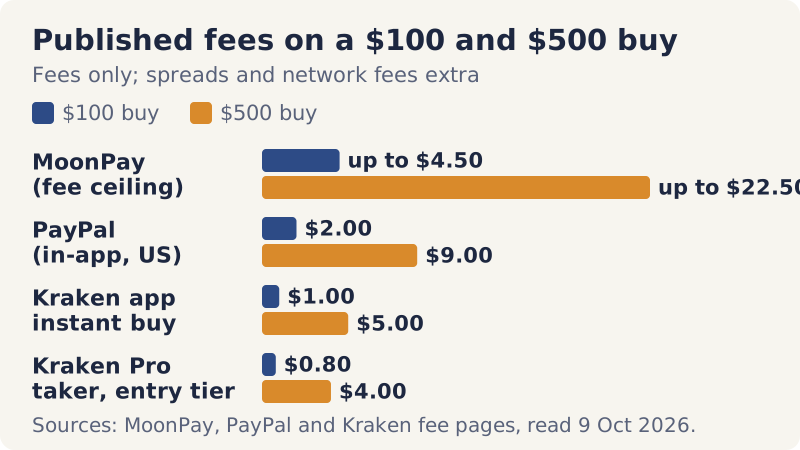
None of these bars is the full price. PayPal estimates its own spread at about 1.00% on top of the fee, which is 2.00% on $100 and 1.80% on $500; Kraken's app adds a spread to instant buys at a 1% fee; and Kraken Pro, where the entry-tier taker fee is 0.80% (0.40% maker), fills you at the order-book price. So the real gap on any given day may be wider or narrower than the chart. Coinbase is missing for a plain reason: its help centre publishes no percentage for a simple buy (the spread and fee appear only on the order preview), and we do not chart numbers that are not published.
If convenience is worth that ceiling for a one-off purchase, MoonPay's checkout shows the full quote before you pay anything. If you expect to buy again, a bank-funded account at Kraken is the cheaper published route, although Kraken does not serve New York or Maine. Both are affiliate links: we may earn a commission, and it changes none of the numbers above.
Is it safe and legit? Licences, registrations and their limits
For a payment company, legit should mean licensed and registered where it operates, and MoonPay is in every place we checked. Its licences page and the regulators' own registers show the following (read 9 Oct 2026):
- New York: a Virtual Currency Business Activity licence (the BitLicense) numbered 0000045, plus a New York money-transmitter licence. MoonPay USA also appears on the NYDFS list of regulated virtual-currency entities.
- Rest of the US: MoonPay USA LLC lists licences in 47 jurisdictions (44 states plus DC, Puerto Rico and Guam) and is registered with NMLS under ID 2071245. Its Louisiana, Tennessee and Virginia licences state that they do not cover virtual currency.
- UK: MoonPay (UK) Limited is registered with the FCA under FRN 944746. The FCA's broader new crypto regime applies only from 25 Oct 2027.
- EU and EEA: MoonPay Europe B.V. holds a MiCA crypto-asset service provider authorisation from the Dutch AFM, number 41000002, dated 30 Dec 2024 and passported to 29 other EEA states. It also appears in ESMA's interim MiCA register.
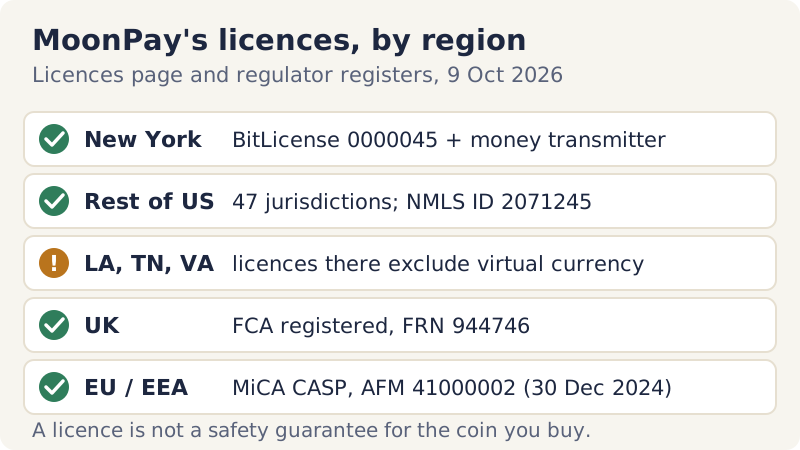
What licences do not do matters just as much. They oblige MoonPay to verify customers, keep records and follow consumer and anti-money-laundering rules. They do not make crypto prices any steadier, and they do not let anyone claw back a blockchain transfer you authorised. We did not complete a search of regulators' enforcement databases for 2025 and 2026, so we make no claim either way about MoonPay's enforcement record; before a large purchase, the NYDFS and FCA registers are the places to look.
Impersonation is the risk you can control. Reach MoonPay through its official site or a wallet you already trust, ignore anyone who contacts you first claiming to be its support team, and never share a one-time code or a recovery phrase. The FBI's IC3 logged 17,355 tech and customer-support scam complaints with a crypto link in 2025, with $1.226 billion in reported losses, so fake support is not a rare edge case.
Payment methods by region: card, Apple Pay, Google Pay, PayPal, bank
Availability is set region by region, and MoonPay's help article on supported payment methods (dated 26 Aug 2026) is unusually specific about it:
| Payment method | Where MoonPay accepts it to buy | Notes |
|---|---|---|
| Visa, Mastercard, Maestro | All regions | Card issuer rules still apply |
| Apple Pay | All regions | Shows only if your bank supports it; on desktop you scan a QR code with an iPhone on iOS 18 or later |
| Google Pay | All regions, on Android | Uses the card saved in Google Pay |
| PayPal | US, UK and EU except Croatia, Hungary and Iceland | Fee appears in the quote |
| Venmo, Cash App | US only | Cash App Pay costs 2.9% + $0.30 |
| SEPA / SEPA Instant | EU | 1–3 business days; no transfers from Wise or C24 Bank |
| UK Faster Payments | UK | About 1 business day |
| ACH bank transfer | Not listed for buying | Listed for selling only, 3–5 business days |
The practical upshot for US readers is that a MoonPay buy cannot be funded by ACH, so the cheap bank rail that exchanges offer is simply not on this menu. Apple Pay and Google Pay pass the card stored in your phone, so they are priced and treated like card payments rather than like bank transfers. For how the rails compare on cost, see our breakdown of card, debit and bank payment methods, and for MoonPay's main rivals, our roundup of the mainstream crypto on-ramps.
On-ramp vs exchange vs other on-ramps: which costs less?
An exchange is a different kind of business. You open an account, deposit money and then trade, usually at a lower published fee than any on-ramp. On Kraken, for example, Pro charges 0.40% maker and 0.80% taker at the entry tier, the app's instant buy costs 1% plus a spread, and ACH deposits are free (all checked 9 Oct 2026). The catch is friction: an ACH deposit on Kraken can be traded almost at once but carries a seven-day withdrawal hold, so coins bought with it cannot leave for your own wallet for a week.
Other on-ramps fill the same slot as MoonPay. Paybis charges a service fee that varies by payment method, with a typical $2 minimum, plus the network fee, and says a first buy carries no Paybis fee; like MoonPay, it publishes no percentage table (read 9 Oct 2026). Changelly is at its strongest as a crypto-to-crypto swap service and offers card purchases through partner providers. With any on-ramp, the method is the same: take two quotes for the same amount on the same day and compare the crypto delivered, not the advertised rate.
When MoonPay is the right tool, and when it isn't
MoonPay earns its fee in a handful of situations: a single small or medium purchase you want now, coins that should land directly in your own wallet, a wallet whose Buy button already opens a MoonPay checkout, or a country where it accepts your preferred payment method and no regulated exchange does.
It is the wrong tool for regular buying, where a percentage ceiling of 4.5% compounds against you; for US buyers who want to pay by bank transfer, which MoonPay does not accept for purchases; for anyone who has been told to buy crypto and send it to an address provided by someone else; and for large amounts where a few percent is real money. If MoonPay fits, compare its final crypto amount against a second quote from Paybis or Changelly. If you will buy again, open a bank-funded exchange account such as Kraken or Coinbase instead. These are affiliate links; a commission never changes the order in which we recommend things.
Affiliate link. We may earn a commission — it never moves a ranking.
Risks and what can go wrong
Price risk comes first and has nothing to do with MoonPay: the coin can fall the moment after you buy it, and nothing on the receipt protects you from that. Transfer risk comes next. Choose the wrong network or paste the wrong address and the coins may be unrecoverable, which is why a small test purchase before a larger one is cheap insurance. Some card issuers also treat crypto purchases as cash advances, with extra fees and immediate interest, so check your card's terms before paying with credit.
Scam risk is the one that costs people the most. The CFTC describes a pattern it calls pig butchering: a stranger met by a wrong-number text, a dating app or social media steers you to a trading site, a small deposit shows quick profits, and withdrawals are then blocked by taxes and fees you must pay first. On-ramps are how many victims fund those deposits. If the address you are pasting came from someone you have never met in person, do not complete the purchase. Our guide to avoiding buy-side scams lists the other patterns, and the complete guide to buying crypto safely covers the steps around this one.
MoonPay questions, answered
What is MoonPay and how does it work?
Is MoonPay safe and legit?
How much are MoonPay fees?
Does MoonPay accept PayPal?
Can a MoonPay purchase be reversed?
New here? Start with the full step-by-step guide to buying crypto safely, or compare card, debit and bank payment methods.